Audit Trail Design: A Practical Guide for Security and AI Teams

A well-designed audit trail answers four questions for any action in your system: who did it, what exactly happened, when, and why it was allowed. To do that, it needs a defined event model, append-only storage, integrity protection, sensitive data kept out of the records, owned review and a retention policy. This guide walks through each of those decisions in the order you will make them.
We work with cybersecurity and AI founders whose buyers ask for evidence, not promises. Audit trails are where that evidence starts.
TL;DR
- An audit trail is the chronological sequence assembled from individual audit log events, so you design the events and the sequence together.
- Define the audit boundary first (what is in scope, including denied actions and failures), then choose fields.
- Store events append-only, correct them with new events, and add hash chaining plus external checkpoints for tamper evidence.
- Keep secrets and personal data out of the records, set retention per event type and give the trail a named owner.
- Requirements differ by sector and country, so map your obligations (FDA, HIPAA, EU rules) before you finalize the schema.
Table of Contents
- What an audit trail is, and how it differs from a log
- Step 1: Define the audit boundary before the fields
- Step 2: Choose what each record contains
- Step 3: Make it append-only and tamper-evident
- Step 4: Keep sensitive data out of the trail
- Step 5: Retention, ownership and review
- Audit trail requirements by sector
- Seven mistakes reviewers find
- Perspective
- FAQ
- Sources
What an audit trail is, and how it differs from a log
A dictionary definition is a good start: an audit trail is a detailed record that can be examined to prove what happened and what decisions were made. The classic example is an auditor following a tax invoice through the books.
In software, the useful distinction is between the parts and the whole. Audit logs are individual security or compliance events, and the audit trail is the full chronological sequence assembled from them so someone can reconstruct what occurred. You write logs. You present a trail.
Audit log vs. event log
These two are often confused, and mixing them is the first design mistake. Event logging captures everything from performance metrics to informational events and serves IT operations and DevOps. Audit logging creates verifiable records of actions that affect security, data integrity or compliance, and serves security teams, compliance teams and auditors. Event logs are broad and technical. Audit logs are narrow and intentional, centered on who took an action.
One more difference matters in design. An audit log should record attempted actions, both successful and failed. In event-sourced systems, event logs record state changes and do not track failed actions that left state untouched. If your only record is the event stream, your denied attempts vanish.
Syslog vs. audit log
On Linux the split is physical. Auditing collects kernel-level data, often in greater detail than system logging; auditd records configured events with type, timestamp, user ID and whether a system call succeeded or failed, and writes to its own audit.log, while rsyslog processes and archives syslog messages. Syslog tells you what services reported. The audit framework tells you what a user or process actually did on the host.
For forensic work the extra detail has a cost: raw audit records encode user IDs as numbers, syscalls as integers and arguments as hexadecimal, so analysts rely on ausearch with the interpret flag to make them readable. Plan for readability on day one, not during an incident.
Step 1: Define the audit boundary before the fields
Most teams start by picking fields. Start with scope instead. For AI systems, a practical boundary covers the request, policy decision, approval, tool request, execution result and outcome, and also defines how denied actions, failures, timeouts, capture failures, retries and out-of-scope events are treated. The same guide recommends settling the boundary before selecting fields, and that order saves rework.
A working boundary document is one page long and answers:
- Which actors exist (users, service accounts, background jobs, AI agents, support staff impersonating customers)?
- Which actions change security posture, data or money?
- Which decisions need a recorded reason?
- What happens when the audit write itself fails: does the action proceed or stop?
- What is explicitly out of scope, and who signed that off?
The last two matter most. A trail that silently skips events when the logger is down is a trail with unexplained holes.
Step 2: Choose what each record contains
The common failure is not too little volume but too little context. Typical mistakes include incomplete change data, missing user or role references, and missing reasons. The cure is to preserve old and new values and the reason for the change.
A solid baseline record has:
| Field | Why it exists |
|---|---|
| Timestamp (UTC, from a trusted clock) | Orders the sequence |
| Actor ID and type (human, service, agent) | Attributes the action |
| Role or permission at the time | Shows authority, not just identity |
| Action and target resource ID | Names what was touched, not just the endpoint |
| Previous and new value | Makes changes reconstructable |
| Outcome (success, denied, error) | Captures failed attempts |
| Reason or ticket reference | Answers “why” |
| Correlation or request ID | Links records across services |
| Tenant ID | Isolates customers in multi-tenant products |
SaaS reviews repeatedly find the same omissions: logging only successful actions, and leaving out denied attempts, tenant or object IDs, impersonation, exports, background-job identity, previous or new values and correlation IDs. Use that as a checklist against your own schema.
Two details are easy to miss in regulated settings. First, log the resource, not the route. A compliance-focused review notes that recording a bulk-export endpoint without saying which patients were exported is a common HIPAA logging mistake. Resolve the resource IDs in the request handler. Second, make audit logging server-side. A UI-only audit layer can be bypassed through direct API calls.
Records for AI agents and approvals
Agent actions need more than a prompt and a response. For tool calls, record the tool name and version, arguments with secrets redacted, an idempotency key, status and the external record ID. For human approvals, record the approver, the decision, the time and a hash of exactly what was shown for approval. That hash settles the later argument over what the approver actually saw. For a deeper walk-through, see our guide to AI audit trails: what to log and how to prove it.
Step 3: Make it append-only and tamper-evident
The rule is simple: existing events are never updated or deleted, and corrections are new events. Enforce it with permissions, not convention. Reviewers look at this directly: auditors check database permission configuration and flag any audit table that allows DELETE. Keeping audit data in the same mutable database as application data is a listed anti-pattern. A practical fix for relational systems is INSERT-only database permissions combined with hash chaining.
What hash chains do and do not prove
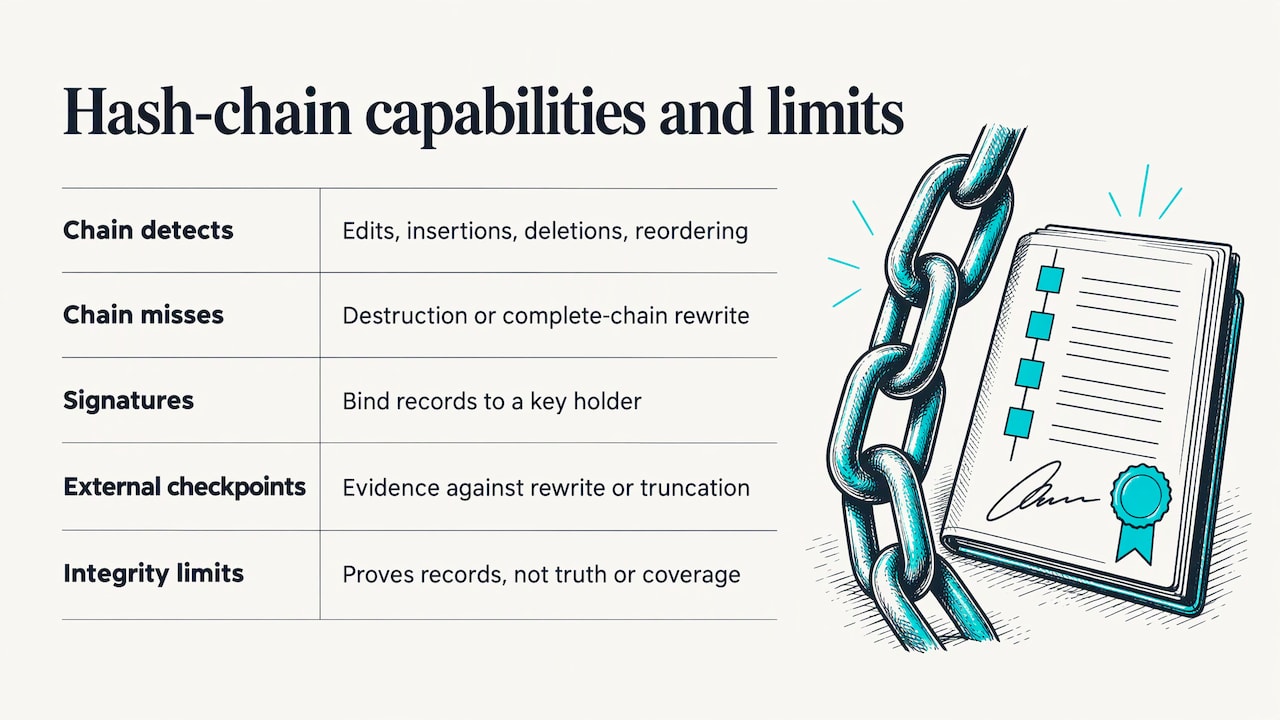
Hash chaining links each record to the one before it. Edits, insertions, deletions or reordering become detectable, but a chain alone cannot detect destruction of the whole log or a rewrite of the complete chain. Two additions close most of that gap: digital signatures bind records to a key holder, and periodic checkpoints stored outside the log operator’s control give stronger evidence against rewriting or truncation.
Be equally honest about the limit of integrity. A log proves what was recorded, not that the event or actor was truthful; a compromised service key can insert false but chain-valid events. And a successful signature check does not prove complete coverage, because an action that was never measured cannot be reconstructed from the hash of another. So integrity controls and boundary design work together. Our guide on tamper-proof logging goes further on building logs you can defend, and chain of custody for digital evidence covers what happens when a log becomes evidence.
Step 4: Keep sensitive data out of the trail
An audit trail that leaks secrets becomes a liability. One practitioner write-up reports that the OWASP Logging Cheat Sheet and PCI DSS both forbid sensitive credentials in logs and advises logging identifiers and event types rather than full personal-data payloads. In healthcare, the same pattern appears as PHI leaking into the audit log by logging entire request bodies, fixed by storing opaque references instead.
Practical rules:
- Log identifiers and references, not payloads.
- Redact at the field level, in code, before the write.
- Scrub error stack traces and request dumps, where credentials tend to slip in.
- Separate access: the people who read the trail should not be the people who can change what is in it.
Step 5: Retention, ownership and review
Two of the most common gaps are organizational. The first is retention: log rotation and database purges can destroy evidence needed later. Set retention per event type, tied to the longest obligation that applies, and keep a documented lifecycle from creation to disposal. Our piece on evidence lifecycle management covers stages and controls.
The second is ownership. One review puts it bluntly: teams producing large volumes of log entries that nobody reviews or categorizes are building a storage problem, not an audit trail. Quality also depends on defined responsibilities, review frequency, dual-control decisions, anomaly handling and retention ownership.
Finally, build the read side. Provide reconstruction queries, evidence exports and tests. A full AI audit playbook includes reconstruction queries, evidence exports, and reconstruction and integrity tests. If you cannot rebuild a timeline in an afternoon, a reviewer will notice.
Audit trail requirements by sector
There is no single global standard. What you must record depends on your industry and your customers’ countries. A few anchors:
- US pharma and life sciences: FDA 21 CFR 11.10(e) calls for secure, computer-generated, time-stamped audit trails for creating, modifying or deleting electronic records; changes must not obscure prior information, and trails must be retained as long as the records and be available for agency review.
- EU GMP: the same analysis notes that Annex 11 section 9 expects risk-based records of GMP-relevant changes and deletions, with documented reasons, and audit trails that are intelligible and regularly reviewed.
- US healthcare: HIPAA’s audit control standard is § 164.312(b), which is why resource-level logging matters there.
- India: companies must use accounting software with an audit-trail feature, and auditors report on whether it operated throughout the year and was tampered with.
- EU AI Act: high-risk AI systems must support automatic event logging over their lifetime. We cover what that means for deals in EU AI Act compliance and traceable evidence.
When you sell across borders, build to the strictest customer requirement and map each field to the rule it satisfies. Confirm current text with the regulator or your counsel before you commit a retention period.
Seven mistakes reviewers find
These recur across the sources above, and each one maps to a design decision:
- Missing events. Teams log manually across services, and new features ship without audit events. Centralize event definitions and review them in every feature spec.
- Inconsistent schemas. Use one event taxonomy and one shared schema.
- Context gaps. Logs that show what happened but not why. Add reason and previous values.
- Mutable entries. Fix with permissions and hash chaining.
- Uneven coverage. Some controls have strong trails while others have thin ones. Assess maturity across the whole control surface.
- Manual additions. Spreadsheets and screenshots as a substitute for system records fail the immutability test.
- Unusable querying. If investigators cannot search and export, the data is not evidence.
Perspective
In our work with cybersecurity and AI founders, the pattern is consistent: the product may be strong, but the buyer’s question is “how do I know?” An audit trail is the first honest answer to that question, and it only works if it is designed as evidence from the start.
Our view is that a trail should be built for the person who will read it under pressure: an auditor, an opposing expert or a customer’s security team. That reader does not care how elegant your logging library is. They care whether each record can be attributed, ordered and shown to be unaltered.
That is why Cybertech Acceleration focuses exclusively on digital forensics for cyber and AI startups. We add a judicial-grade evidence capability to a product, then help founders turn that technical depth into a commercial story investors and customers understand. A startup that can show a defensible trail does not just pass reviews faster. It stands apart in a crowded market.
Thiago Vieira
FAQ
How do you create an audit trail?
Define the audit boundary, then an event model with actor, action, resource, outcome, old and new values and reason. Write events server-side to append-only storage with integrity protection, redact sensitive data, set retention and access controls, and test that you can reconstruct a timeline from the records.
What is an example of an audit trail?
A change to a user’s permissions is a clear case. The trail shows who made the change, the role they held, the previous and new permission, the time, the ticket or reason, and the outcome. Strung together with related events, it reconstructs the whole sequence.
What is the difference between an audit log and an event log?
Event logs are broad operational records used by IT and DevOps teams. Audit logs are narrow, deliberate records of actions that affect security, data integrity or compliance, including failed attempts. Audit logs focus on who did what.
Is syslog enough as an audit trail?
Usually not. Syslog carries what services choose to report. On Linux, the audit framework records configured kernel-level events such as file access and system call outcomes in its own file, so many teams run both and forward them to central storage.
Sources
- audit trail is a detailed record that can be examined to prove what happened and what decisions were made
- Audit logs are individual security or compliance events, and the audit trail is the full chronological sequence assembled from them
- Event logging captures everything from performance metrics to informational events and serves IT operations and DevOps. Audit logging creates verifiable records of actions that affect security, data integrity or compliance, and serves security teams, compliance teams and auditors
- event logs record state changes and do not track failed actions that left state untouched
- Auditing collects kernel-level data, often in greater detail than system logging; auditd records configured events with type, timestamp, user ID and whether a system call succeeded or failed, and writes to its own audit.log, while rsyslog processes and archives syslog messages
- raw audit records encode user IDs as numbers, syscalls as integers and arguments as hexadecimal, so analysts rely on ausearch with the interpret flag to make them readable
- a practical boundary covers the request, policy decision, approval, tool request, execution result and outcome, and also defines how denied actions, failures, timeouts, capture failures, retries and out-of-scope events are treated
- record the tool name and version, arguments with secrets redacted, an idempotency key, status and the external record ID
- Edits, insertions, deletions or reordering become detectable, but a chain alone cannot detect destruction of the whole log or a rewrite of the complete chain
- A log proves what was recorded, not that the event or actor was truthful; a compromised service key can insert false but chain-valid events
- OWASP Logging Cheat Sheet and PCI DSS both forbid sensitive credentials in logs
- FDA 21 CFR 11.10(e) calls for secure, computer-generated, time-stamped audit trails for creating, modifying or deleting electronic records; changes must not obscure prior information, and trails must be retained as long as the records and be available for agency review
- companies must use accounting software with an audit-trail feature, and auditors report on whether it operated throughout the year and was tampered with